
Local SHA‑256 comparison
All calculation happens in this tab. No file or hash is sent to a server. A match says nothing about the trustworthiness of the reference.
What the result means
No reference supplied: you have calculated an identifier. This can help compare future copies, but it does not authenticate the current file.
Match: the local file and the reference have the same SHA‑256 value. This is useful only to the extent that the reference can be trusted. Copying both the APK and hash from one unknown mirror establishes very little.
Mismatch: the bytes differ. This may be a different release, an incomplete transfer or an altered file. Do not install first and investigate later.
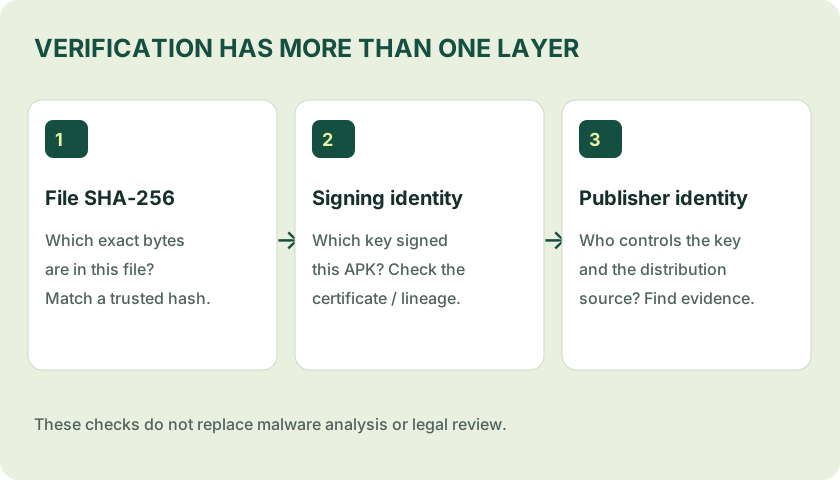
File hash and signing-certificate digest are different
A file SHA‑256 changes when the file bytes change. A signing-certificate fingerprint identifies a certificate that may sign many releases. Do not paste a certificate fingerprint into a field asking for the APK file hash.
For a technical inspection, Android SDK Build Tools provides apksigner. On a computer with those tools installed, run:
apksigner verify --verbose --print-certs app.apkCompare the signer information with a trustworthy publisher record and, for updates, the installed app’s accepted signing lineage. A successful signature check validates the package’s signing structure; it is not a malware audit or a brand-ownership certificate.
Desktop file-hash alternatives
Run a command locally on a file you already possess. These examples calculate the file hash only; they do not install or execute the APK.
Windows PowerShell
Get-FileHash -Algorithm SHA256 -LiteralPath .pp.apkLinux
sha256sum app.apkmacOS
shasum -a 256 app.apkVerification scope on 3pattimst
No Teen Patti Master APK has been submitted for examination in this edition. There is no publisher hash to prefill and no certificate fingerprint to publish. The tool accepts the reference you choose; the site does not endorse it.
A future evidence report must name the file, source, collection time, test method and limits. An observed install on one device would not establish safety on every phone or legal availability in India.
Sources & scope
References consulted 22 October 2026. General guidance is not a test of a specific app file.