
Before opening an APK
Check the Android version under Settings → About phone, available storage and the exact release requirements. This site has no verified app minimum specification. Do not rely on the Android 5.0+ or file-size figures shown on unrelated pages.
If the app is already installed, read the update guide first. Reinstallation can delete local data or leave you unable to restore access.
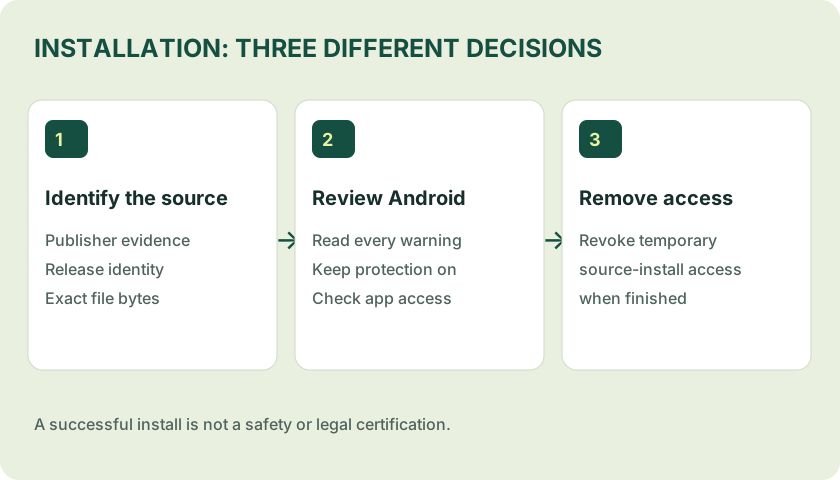
A careful installation sequence
- Confirm the source. Match the distribution domain with a publisher-controlled record. If that connection cannot be established, stop.
- Finish and inspect the download. Check the filename, byte size and release evidence. Use a file hash comparison when a trustworthy reference exists.
- Open the file on Android. Use the device’s Downloads view or file manager. A partial download or an HTML page saved as .apk is not an installer.
- Review Android’s prompt. Some devices offer “Install unknown apps” for the specific browser or file manager that opened the file. Menu wording varies. Authorise only the required source, only after the earlier checks.
- Read security messages. Keep Play Protect enabled. Cancel if Android flags the file as harmful or the publisher identity is inconsistent. Do not follow instructions to disable protection.
- Review app access. Grant only permissions whose purpose you understand. A card tutorial should not need remote access to your phone.
- Remove temporary install access. Revisit the same source’s install setting and turn it off when it is no longer needed.
When installation is restricted
A managed work phone, parental control, Advanced Protection or a device security policy can prevent sideloading. Treat that restriction as a reason to use an approved distribution channel or ask the device administrator. Do not remove a security policy to install a card game.
Android prompts vary by operating system and manufacturer. The general path is not a guarantee that a particular APK is supported. A successful install does not confirm that a server, account or game mode is available.
When to stop instead of retrying
- The download asks you to install a separate downloader or device-management profile.
- Someone requests an OTP, UPI PIN, banking password or screen-sharing session.
- The installation asks for accessibility or SMS access without a clear, credible purpose.
- A new installer claims you must first delete a working app because its signature is “wrong”.
For an error with no security warning, record the exact wording and use the error-by-error troubleshooting table.
Sources & scope
References consulted 22 October 2026. General guidance is not a test of a specific app file.